
BUILT FOR BANKRUPTCY ATTORNEYS

Bankruptcy attorneys:
less paperwork between
intake and filing.

Spend more of your day on your clients and their cases. Fresh Start helps bankruptcy attorneys connect intake, documents, income analysis, and petition preparation, with less manual entry for you and your team.

No credit card required.

See Fresh Start in action on our features page.

See case information update the bankruptcy forms as you work.

Your firm's bankruptcy workflow,
connected from intake to filing.

  1. Client intake
  2. Populate forms
  3. Collect documents
  4. Analyze income
  5. Review the case
  6. E-file & track

STEP 1 · CLIENT INTAKE

Let clients start the intake.
Give your firm a head start.

Clients complete guided bankruptcy questionnaires. Their answers populate the forms and tell Fresh Start which documents to request, giving you and your staff case information to review.
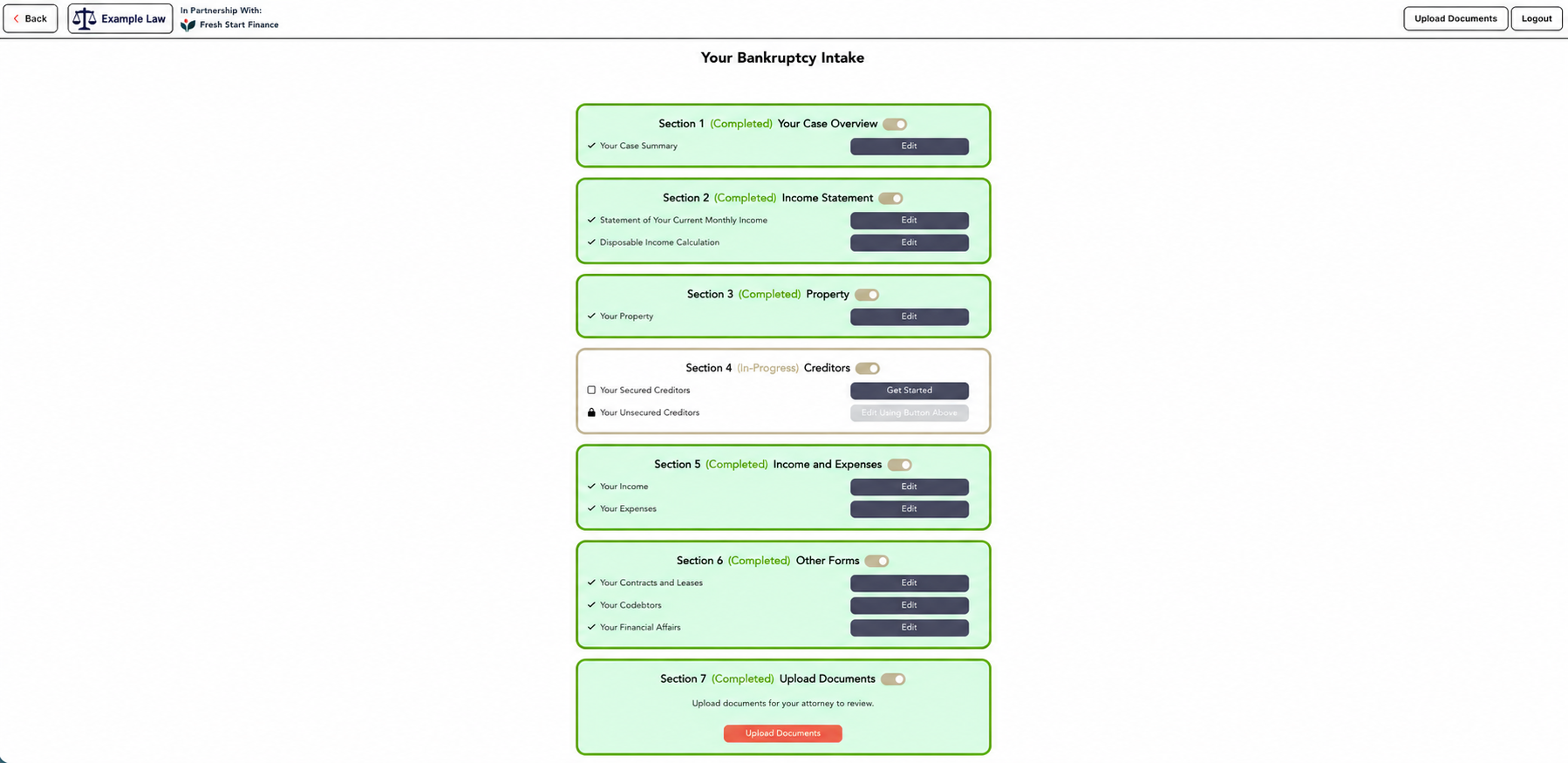
Example Law client intake with guided bankruptcy questionnaire sections
Your client works through the bankruptcy questionnaires.

STEP 2 · AUTOMATIC FORM ENTRY

Intake answers in.
Bankruptcy forms filled.

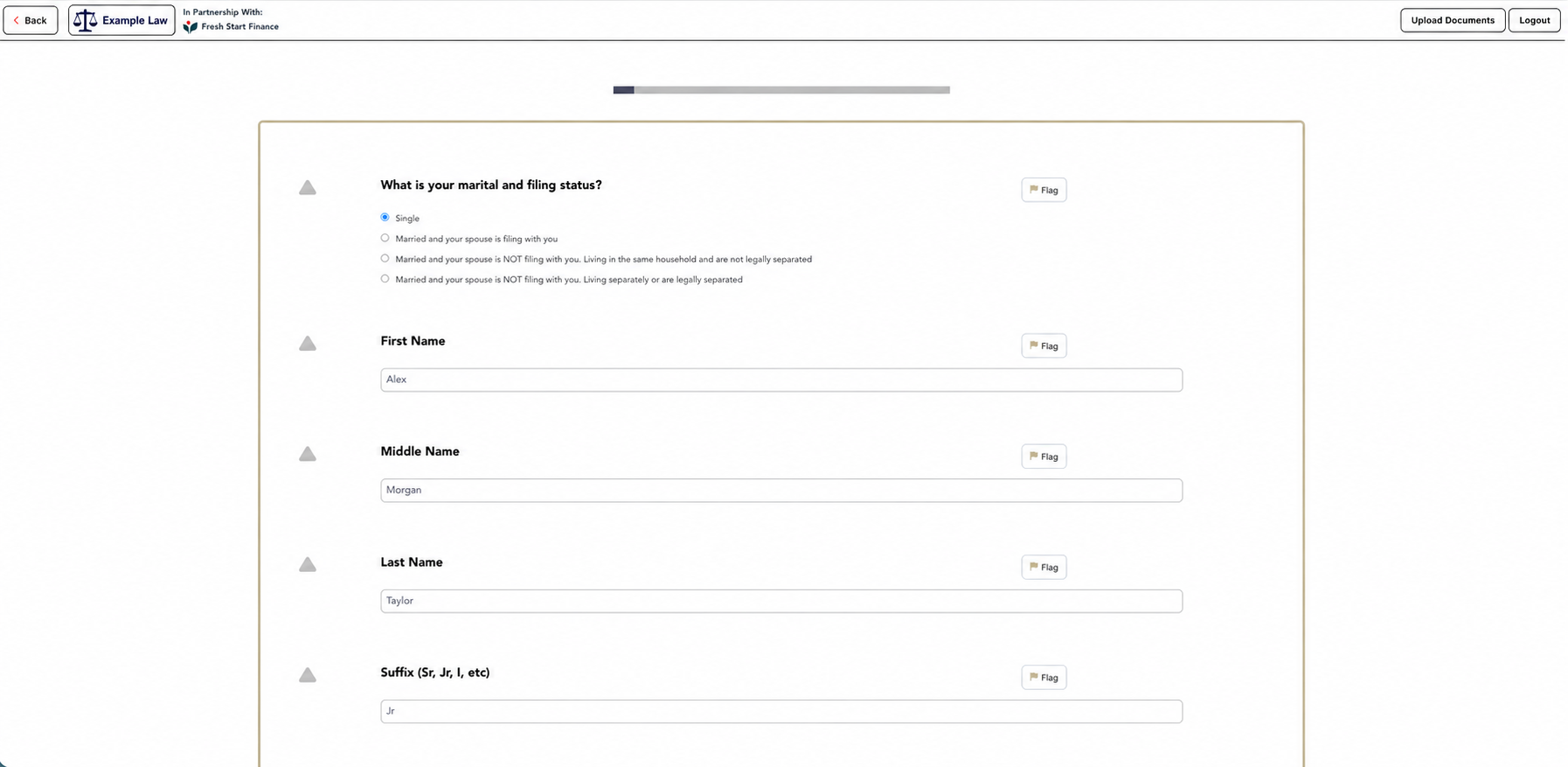
Give your bankruptcy practice a direct path from client answers to petition preparation. Intake information populates the forms automatically, so your team can review the entries instead of typing them again.

Example Law guided client questionnaire collecting information for the bankruptcy forms
Answers populate the forms and trigger document requests.

Credit reports work here, too. Import the report to populate the debts.

STEP 3 · DOCUMENT COLLECTION

Put the documents to work.
Save your team the sorting.

Let intake answers drive your firm's document requests. Collect or upload 100 documents together. Fresh Start reads, renames, and organizes the files, then uses their data in the bankruptcy forms.

  1. Request documents automatically from intake answers
  2. Read, rename, and organize automatically
  3. Use document data in the forms

Preview unavailable. Open the recording.

Watch uploaded files become named, organized documents.
7f2a9c_00481.pdf February 2026 Bank Statement.pdf

Explore this workflow on our features page.

See document data flow into the Income Analyzer, Schedule I, and bankruptcy forms.

STEP 4 · INCOME ANALYZER

From pay stubs
to Schedule I.

Review the income analysis from pay stubs and documents already in the case. Calculate Schedule I, then move the reviewed results into the bankruptcy forms in one or two clicks.

The source document stays within reach.

Bank accounts identified from the documents are added to the forms. Open the associated document from a financial account in one click.

DOCUMENT AUTOMATION FOR BANKRUPTCY ATTORNEYS

Collect the files.
Keep the paperwork moving.

See how your firm collects client documents, requests updates, and connects document data to the bankruptcy petition.

CLIENT DOCUMENT EMAIL

From their inbox to their profile.

Give each client a dedicated email address. Documents they send automatically upload to the correct profile.

Preview unavailable. Open the recording.

DOCUMENT CORRECTIONS

Show clients what needs updating.

Add a note explaining the requested correction and include it in the client's document request email.

Preview unavailable. Open the recording.

BANK BALANCE REQUESTS

Request the figures you need.

Prepare a balance request email so clients can supply their current account balances.

Preview unavailable. Open the recording.

DOCUMENT DATA IN THE PETITION

Keep the source document beside the entry.

Use document data in Fresh Start's bankruptcy forms. Review bank-account information with the source statement within reach.

Preview unavailable. Open the recording.

Try the document workflow

14-day free trial. No credit card required.

STEP 5 · REVIEW THE CASE

Review the petition.
See the changes immediately.

As the bankruptcy attorney reviewing the case, see case information alongside the official forms. Correct an account or update a value and review the change immediately, without generating another PDF.

Explore live forms on our features page.

Watch the actual software update the official bankruptcy forms.

Keep your team's case preparation and your petition review connected, with case information and official forms side by side.

"Being able to make instant changes to the forms is a game changer."
Fresh Start Finance partner

STEP 6 · E-FILE & TRACK

From filing to the 341.
Keep the case on track.

File in one click, without repeating PACER's two-factor authentication every time.

Court notices become calendar events.

Keep your firm's case dates in view. Court notices arrive automatically, and dates, including 341 meetings, are added to your calendar in Fresh Start.

Fresh Start Finance automated court notices

Explore this workflow on our features page.

Court notices and case dates, connected to the software calendar.

ALSO IN FRESH START · CHAPTER 13

Review the Chapter 13 plan.
Test changes before filing.

Use the Chapter 13 plan calculator alongside your case preparation. Review the numbers and see how changes affect the plan as you work through the case with your client.

Try the calculator
Fresh Start Finance Chapter 13 plan calculator

Explore this workflow on our features page.

The Chapter 13 plan calculator in Fresh Start Finance.

PLANS & PRICING

Try it on a case.
Choose the plan that fits.

Every plan starts with a 14-day free trial. No credit card required, and no automatic charge when the trial ends.

Starter

$59 User/mo

Paid annually

A simple way to start using Fresh Start Finance for bankruptcy filings.

Get Started →
  • Unlimited Cases
  • Chapter 7 and Chapter 13s
  • Automated ECF
  • Dynamic PDF Generation
  • Credit Report Integration
  • Local Forms
  • Payment Processing
  • Payment Reporting
  • Creditor Database
Most Popular

Growth

$79 User/mo

Paid annually

For firms that want more automation and a faster process to finish cases.

Get Started →
  • Includes everything in Starter plus:
  • Filing Form Templates
  • Calendar Integration
  • Task Automation
  • Smart Exemption Setting Schedule C
  • Unlimited Emailing
  • 1000 SMS Per Month
  • Court Notice Ingestion
  • Existing Client Import
  • 10GB of Secured Document Storage/Month
  • Encrypted Data Storage

Enterprise

$99 User/mo

Paid annually

For firms that need deeper customization, reporting, and support.

Get Started →
  • Includes everything in Growth
  • Multi-Office Support
  • Chapter 13 Calculator
  • Chapter 13 Plan Documents
  • Post Filing Templates
  • Customized Reporting
  • Customized Integrations
  • Dedicated Account Manager

Other pricing

Simple usage-based add-ons for firms that need document automation, client intake, e-signatures, additional text volume, or more storage.

Documentation Automation + Income Analyzer $19 per case
Client Intake / Portal Access $7 per case
Electronic Signature Software $2 per signed agreement
Additional SMS $0.01 each
Additional Storage $5 per additional 10GB per firm per month

BRING YOUR CASES WITH YOU

Your next case doesn't
have to start from scratch.

Bring existing Chapter 7 and Chapter 13 case data into Fresh Start using supported NextGen XML files. Upload the file, review the identified information, and import the case.

Fresh Start Finance bankruptcy case migration

Explore this workflow on our features page.

Upload your supported case file. Review before importing.

Less paperwork for bankruptcy attorneys.
More time for your clients.

14 days. No credit card. No automatic trial charge.

Explore the features in your selected plan. Plan inclusions and optional add-on prices are listed above.